EEPROM data format
JetHome controllers store board identification data in the EEPROM chip on the I2C bus: board name and version, serial number, MAC address, processor identifiers, and on some devices, a manufacturer digital signature. The chip address is specified in the description of each controller.
Data is written in the JEEFS format: a board header with a checksum, followed by a simple file system. The format is open; its reference implementation is the jeefs library for C, C++, Python, and Rust.
See also
Manufacturer signature verification is described in section Digital signature verification.
Memory layout
Offset |
Size |
Content |
|---|---|---|
|
256 bytes |
Board header (512 bytes in obsolete version 1) |
|
variable |
File system: chain of files, each file is a 28-byte header plus data |
after the last file |
until the end of memory |
Free space, bytes |
Common rules for all structures:
Multi-byte fields are stored in little-endian order.
Structures are packed without alignment.
Checksum — CRC32 per IEEE 802.3 (polynomial
0xEDB88320), matches thecrc32()function of the zlib library. Stored in little-endian order. In the board header and in thedevice.idrecord it covers all bytes of the structure up to the checksum field. The file has two checksums:headerCrc32covers the file header bytes up to itself, whilecrc32covers the file data, not the header.Reserved bytes within written structures are equal to
0x00. The unwritten area of an erased chip reads as0xFF. Both values indicate the absence of data, and the integrity of written data is determined by the signature, version, and checksum.String fields come in two types:
null-terminated strings (
boardname,boardversion) — up to 31 characters, a null byte must follow the string;fixed-length strings (
board_serial,usid,cpuid) — printable ASCII characters (0x20–0x7E), padded with null bytes. If the value fills the field entirely, there is no null byte.
Board header
The header describes one board. The processor module and the motherboard each carry their own header in their EEPROM.
Header version determination
The first 12 bytes are identical for all versions:
Offset |
Size |
Field |
Description |
|---|---|---|---|
0–7 |
8 |
|
Signature |
8 |
1 |
|
Header version |
9–11 |
3 |
— |
Meaning depends on version |
Detection order:
Read 12 bytes and compare the signature byte by byte. If all bytes equal
0x00or0xFF, the header is not written.Select the structure based on the
versionbyte: version 1 — 512 bytes, versions 2, 3, and 4 — 256 bytes.Unknown version — parse error.
Header version 4
The current header version is 4.
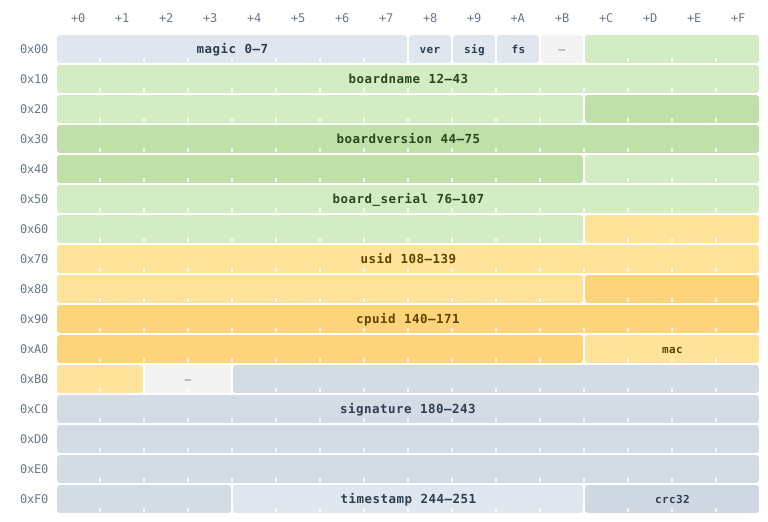
Layout of header version 4. Rows are 16 bytes each, the row address is shown on the left. Green marks board information, yellow — values that build the string signed with the device signature (see Digital signature verification).
Offset |
Size |
Field |
Description |
|---|---|---|---|
0–7 |
8 |
|
Signature |
8 |
1 |
|
Header version: 4 |
9 |
1 |
|
|
10 |
1 |
|
File system version number, current version is 1 |
11 |
1 |
— |
Reserved |
12–43 |
32 |
|
Board name |
44–75 |
32 |
|
Board version |
76–107 |
32 |
|
Board serial number |
108–139 |
32 |
|
Internal device identifier (USID) |
140–171 |
32 |
|
Processor identifier |
172–177 |
6 |
|
MAC address, 6 bytes in binary |
178–179 |
2 |
— |
Reserved |
180–243 |
64 |
|
|
244–251 |
8 |
|
Header write time: signed 64-bit number, seconds of Unix time |
252–255 |
4 |
|
CRC32 of bytes 0–251 |
Field meanings:
board_serial— serial number of this board. The device serial number as a whole is stored in thedevice.idrecord.usidandcpuidare filled if the board has such identifiers, otherwise the fields are zero. For JXD series controllers,usidis a string of 30 characters,cpuidis the factory MAC address of the ESP32 microcontroller in the formXX:XX:XX:XX:XX:XX.timestamp— header write moment. A value of 0 means no time is set.
A header whose bytes from offset 12 to the crc32 field are all zero is empty: it reserves space for the header but contains no board data.
Reading the header
Determine the version by the first 12 bytes.
Compare the CRC32 of bytes 0–251 with the value in bytes 252–255.
Extract strings: up to the first zero byte, and if there is none — the entire field.
Read
fs_version— the file system version number, which is described below. An unknown version is a parse error.Ignore non-zero bytes in reserved fields.
File system
The file system version is written in the fs_version byte of the board header; the current version is 1. Files form a one-way chain that starts right after the board header: at offset 0x0100, or 0x0200 for header version 1. Each file is a file header followed by data.
File header
Offset |
Size |
Field |
Description |
|---|---|---|---|
0–15 |
16 |
|
File name: up to 15 printable ASCII characters, terminated by a zero byte |
16–17 |
2 |
|
Data size: from 1 to 32767 bytes |
18–21 |
4 |
|
CRC32 of the file data |
22–23 |
2 |
|
Offset of the next file from the start of EEPROM; |
24–27 |
4 |
|
CRC32 of bytes 0–23 of the file header |
Chain rules
File data with offset
Aand sizeDoccupies bytes fromA+28toA+28+D-1, the next file starts atA+28+D. For the last file in the chain, thenextFileAddressfield equals0x0000or0xFFFF; for other files, it must contain exactly this calculated value; any other value indicates corruption.The file is stored contiguously. When a file is deleted, subsequent files shift into its place, and the freed end is filled with
0x00.Files are arranged in the order of addition. The exception is the
device.idfile: it is always first.A slot is free if the first byte of the name equals
0x00or0xFF. A written name with an incorrectheaderCrc32indicates corruption, not a free slot.headerCrc32is verified when traversing the chain for each header, and datacrc32— on every file read.Offsets are 16-bit, so the memory size does not exceed 64 KB.
Device identification data
A device may consist of multiple boards, each with its own EEPROM. The model, serial number, and hardware revision of the device as a whole are stored separately from the board data — in the device.id file, so that device identification data is preserved when a board is replaced during repair.
The device.id file is always first in the chain, so the loader obtains device data by reading 540 bytes: board header (256), file header (28), and record (256). With version 1 header — 796 bytes.
Record format of device.id, 256 bytes:
Offset |
Size |
Field |
Description |
|---|---|---|---|
0–7 |
8 |
|
Signature |
8 |
1 |
|
Record version: 1 |
9 |
1 |
|
Device signature algorithm: 0 — no signature, 1 — ECDSA secp192r1, 2 — ECDSA secp256r1 |
10–11 |
2 |
— |
Reserved |
12–43 |
32 |
|
Device model |
44–75 |
32 |
|
Device serial number |
76–91 |
16 |
|
Hardware revision: numbers separated by a dot with an optional variant letter, e.g., |
92–93 |
2 |
|
Flags, all bits reserved: write 0, ignore on read |
94–179 |
86 |
— |
Reserved |
180–243 |
64 |
|
Device signature: a pair of numbers |
244–251 |
8 |
|
Record creation time, seconds of Unix time |
252–255 |
4 |
|
CRC32 of bytes 0–251 |
Record string fields are fixed-length strings. The record tail (signature, timestamp, crc32) is located at the same offsets as in the board header. The record is protected by two checksums: its own and the CRC32 of the file data. Therefore, it can be verified both inside the file system and separately when extracted.
Record reading rules:
A buffer consisting entirely of
0x00or0xFFmeans there is no record.record_versionother than 1 and unknownsignature_versionare a parse error.
The record signature is the device signature. What it signs and how to verify it is described in section Digital signature verification.
Previous header versions
The jeefs library parses all header versions.
Version |
Size |
Differences from version 4 |
|---|---|---|
1 |
512 bytes |
There are no |
2 |
256 bytes |
There are no |
3 |
256 bytes |
The layout matches version 4, and the field at offset 76 is called |
In versions 1 and 2, byte 10 is described as part of the reserved area, but it always remains the fs_version byte: a file system write places the version number in it and recalculates the header checksum. When rewriting the header, this byte must be preserved.
The jeefs library
The jeefs library implements the format in several languages. Implementations are checked by a common set of tests and reference images.
Language |
Installation |
Features |
|---|---|---|
Python |
|
Headers, writing |
Rust |
|
Headers, writing |
C, C++17 |
CMake package |
Headers, writing |
Parsing an EEPROM image in Python:
from pathlib import Path

from jeefs import parse_image

image = parse_image(Path("eeprom.bin").read_bytes())
header = image.header
if header is None:  # the Python package does not parse v1 and v2 fields
    print(f"v{image.version}: header fields unavailable")
else:
    print(f"v{image.version}", header.boardname, header.boardversion, header.mac)
for file in image.files:
    print(file.name, len(file.data))
The parse_image function raises a ValueError exception if the board header is not found or is damaged, the file chain is broken, or the file system version is unknown. Files with an incorrect data checksum are listed in image.unreadable. For images with headers of versions 1 and 2, image.header is None: the Python package does not parse the fields of these versions; they are read by the C implementation.